

An assistant that makes your Mac easier.
Say what you need and it is done. Opens apps, arranges windows, takes notes and fixes your words, so you can stay with whatever you were doing.
 29°CWed 23 Sep 8:14
Just say it.
Tappy does it.
Hold two keys and talk to your Mac. It opens, arranges, writes and rewrites while your hands stay where they are.
⌃⌥ to talk · ⌃⌘⌥ to type · ~712ms to open an app
note what tappy can do
listening…
What it does
Three things you stop doing by hand
No dashboard, no setup, no learning a syntax. Just the things you were going to do anyway, done while you talk.
Stop hunting for windows
“Open Spotify in fullscreen.” “Put this on the left half.” “Hide everything except Chrome.” Your screen arranges itself while you keep typing.
Fix your writing where it sits
Select any text, anywhere, and say how you want it. It comes back rewritten in place: an email, a post, bullet points, or just fewer words.
Start your day with a sentence
“Start my day” can mean dark mode, music on, three apps open, a note ready and the dashboard up. You decide what it means.
Side by side
Ask them both to open Chrome
Both clips start together and run at their own length. The gap between them is the whole argument.
Recorded on the same Mac, one after the other. Neither clip is sped up or cut.
How it works
Three beats, and nothing to open
No window, no chat, no app to switch to. The panel grows out of the notch while you hold, and shrinks back into it when it is done.
Hold two keys
From anywhere. There is no window to find and nothing to click. The panel grows out of the notch while you hold.
Say it normally
Not commands, just words. “Chuck some music on” and “play something” land in the same place.
Let go
It happens. Usually before you have finished thinking about it.
Use cases
The ones nobody expects
Every phrase here works today. Most of them are several things at once, which is the part people do not see coming.
“prepare for my meeting with the design team”
Opens Teams, waits for it to actually be there, and leaves a note already titled after the meeting. One phrase, three steps, in order.
“open spotify in fullscreen and put chrome on the left half”
Two instructions in one breath. It splits them, runs them in the order you said them, and waits for each app to come forward before touching its window.
“hey tappy, start my day”
Said across the room with the wake word on. Dark mode, music playing, the apps you need, a note for today, and the dashboard fullscreen in Chrome.
“close everything except chrome”
It hears the exception. Everything else quits, anything with unsaved work still asks first, and “undo that” brings the lot back.
“format this”
Select a mess of text and it picks the structure itself: numbered for steps, bullets for parallel points, headings when there are several topics, prose when it is only a sentence.
“work mode”
A step in a routine can run any macOS Shortcut, so anything you have already automated there gets a spoken trigger without writing a line of code.
Say anything
You already know how to use it
There is nothing to memorise. Say it the way you would say it to a person, and it works out the rest. Here are 50 of them, taken straight from the app.
Apps and windows
Looking things up
Writing
Music
Your Mac
And when it is not sure what you meant, it does nothing at all. That is the whole trick to leaving a microphone open.
Speed
0.71s
to open an app, from the moment you stop talking
Fast enough that you keep going instead of watching it. That is the median across 176 real commands, not a best case.
- Quit an app0.52s
- Quit what you are in0.56s
- Switch to dark mode0.62s
- Minimise a window0.67s
- Rewriting your text takes about three seconds, because something has to sit and write the new version. Worth saying, rather than quoting only the quick half.
11 themes
Make it look like your Mac
The panel is the only thing you ever see, so it may as well suit the desktop it sits on. Pick one to try it.
put this on the left half
window_position · 0.6s
TechHub. The studio's own backdrop: near-black under a fine dot grid.
Every Mac
No notch? Covered.
Tappy works just the same on Macs without one. The panel drops out of the menu bar instead, and nothing else about it changes.
With a notch
Without one
Make your own
Drag and configure your own workflows
Build a routine out of steps, drag them into the order you want, and describe in plain words when it should run. No files to edit.
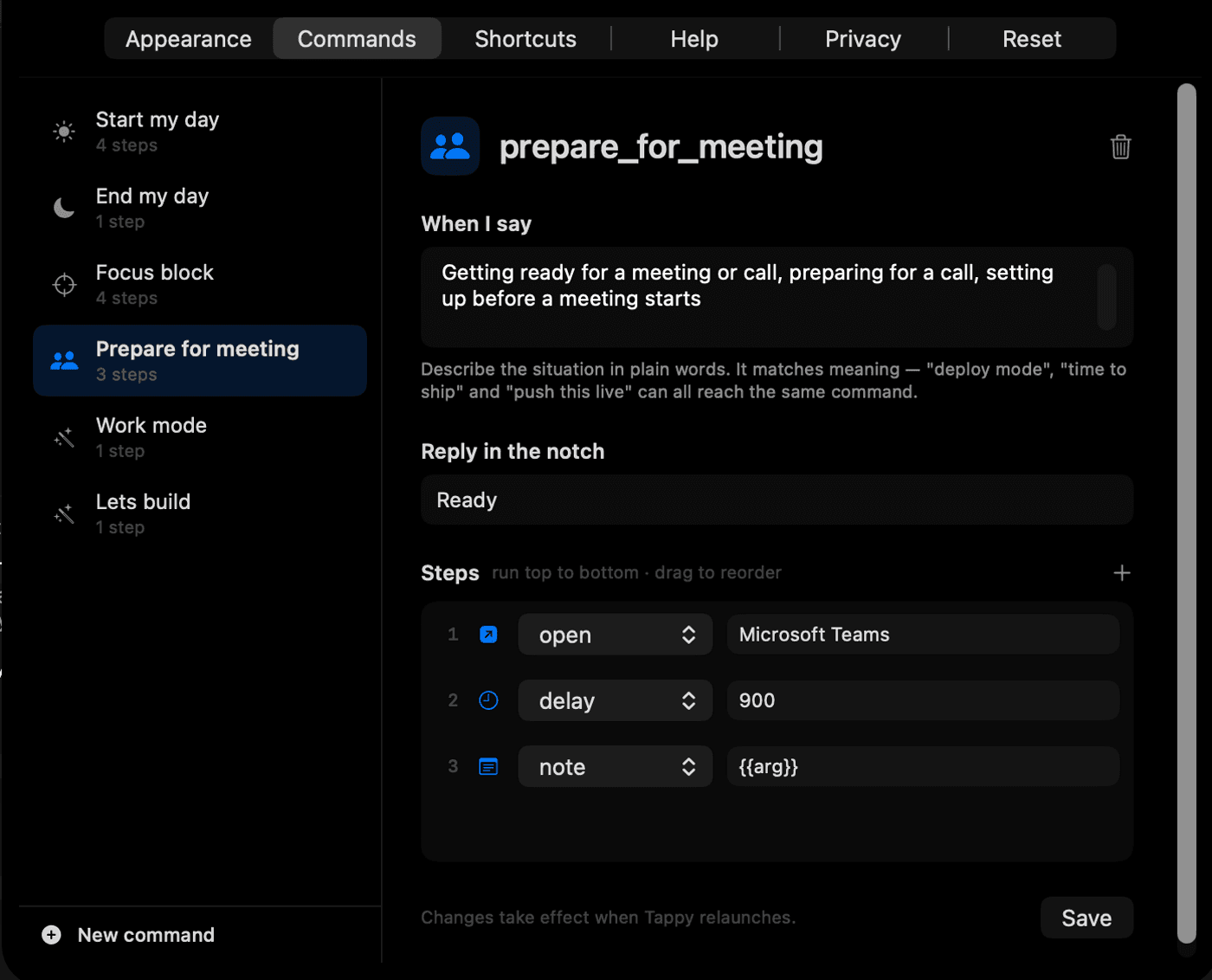
Describe it, don't spell it
The “When I say” box takes a description of the moment, not exact words. “Focus block”, “going heads down” and “let me concentrate” all reach the same routine.
Thirteen things a step can do
Open and quit apps, open a URL, fullscreen a window, make a note, flip dark mode, control Spotify, set the volume, pause, and run any macOS Shortcut you already have.
Nothing to rebuild
Add your steps, pick what it replies in the notch, hit save. It answers to your voice as soon as Tappy relaunches.
Your voice stays here
Speech is turned into text by your Mac. No audio is uploaded, and none is ever saved to a file.
Only the words leave
What gets sent is the text of the command and the name of the app you are in, which is enough to work out what “it” means.
Nothing to sign up for
No account, no tracking, no analytics. Exactly one file makes network requests, and nothing else does.
FAQ
The questions worth answering
What do I need to run it?+
A Mac on macOS 13 or later. On first launch it asks for permission to see the shortcut and move windows. Once, and never again.
Does it work offline?+
Your speech is transcribed on the Mac, so that part does. Working out what you meant is a quick call out, so that part needs a connection.
Which apps does it work with?+
Opening, quitting, hiding and window commands work with anything. Notes, Spotify and Chrome are wired up for notes, music and search.
Do I have to keep holding a key?+
No. Turn on the wake word and say “hey tappy” instead. It is off by default, because leaving a microphone open should be your choice.
How do I get access?+
Email us and we will add you to the next group. It is in testing, so a fixed number of places go out at a time rather than all at once.
Early access
Be one of the first to use it
Tappy is still in testing, so places are limited and go out a fixed number at a time. Email us and we will send it over when one opens.
Why it is limited
Letting a set number of people in at once means we can answer all of them and fix what they run into before the next group. You are not on a waiting list forever; you are in the next one.
macOS 13 or later. Or email info@techhubai.co.